


Pumpkin figurine 3D print, a free cheerful desk buddy
Two posable Halloween characters, no supports, free to download
 Leon Founder & Lead Designer
Founder and lead designer, focused on new concepts, 3D design and developing our digital tools.
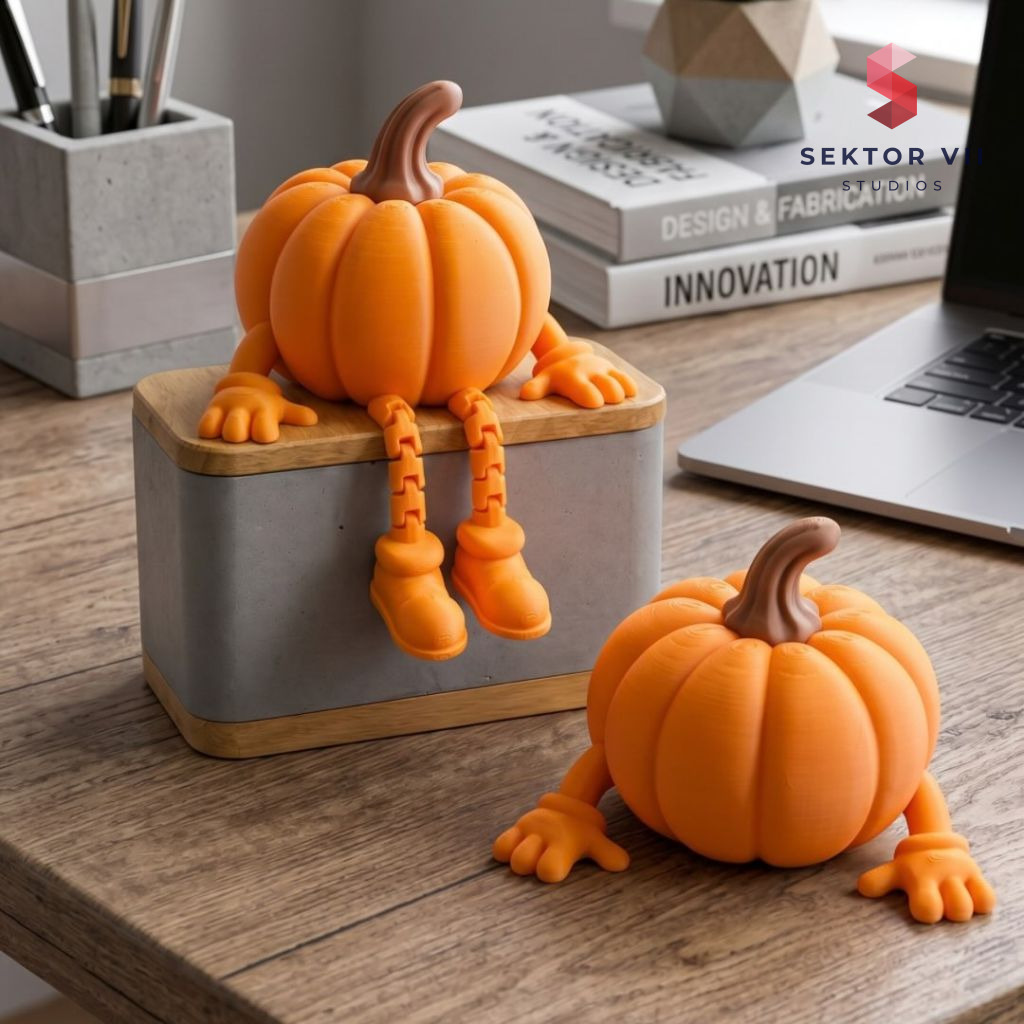 A real photo of our own print, shot in our white light box. The clean white background is real studio lighting, not a render - we print every model ourselves.We print every model ourselves. This render shows the original model exactly as it comes off the printer - only digitally staged.
Contents
Hello from Sektor 7 Studios. Today we are taking the Pumpkin figurine 3D print apart figuratively, of course, and looking at what went into the design and what makes it stand out once printed.
The pumpkin figurine 3D print we’re sharing this month started with a simple question: how do you make a Halloween decoration that feels like a character instead of a prop. Pumpkin Buddy answers that with a round little body, stubby arms, and a face that reads as friendly rather than scary.
It’s the kind of thing you’d want sitting on a shelf through all of autumn, not just on the thirty-first.
Two versions, one cheerful character
Pumpkin Buddy comes in two forms. The normal version has a pumpkin body with arms and hands, simple and quick to print. The articulated version adds flexible print-in-place legs and chunky shoes, which means you can actually pose it sitting on the edge of a shelf, crawling across a desk, or perched on a box like it climbed there itself.
Both share the same round pumpkin head and the same warm, slightly goofy expression that makes this one work as a character rather than just a seasonal shape.
What the pumpkin figurine 3D print looks like on your desk
Printed, Pumpkin Buddy is small and sturdy looking, built for a spot next to your keyboard or on a windowsill where you’ll actually see it every day. The articulated legs give the posed version a loose, slightly floppy sitting position rather than a stiff standing one, which is what sells the character part of the design.
The separate stem on top reads as a distinct piece visually, especially if you print it in a different color, giving the whole figure a tidy two-tone look without any complicated painting.
How it prints
Both versions are designed to print without supports, which keeps things simple if you’re printing this for the first time or just don’t want to spend time cleaning up support marks afterward. The articulated legs are print-in-place, so they come off the plate already jointed and posable, no assembly needed there.
No AMS or multicolor system is required anywhere in the process. The model is built as separate parts instead, so you print the body, the legs if you’re doing the articulated version, and the stem separately, then swap filament between them. The stem specifically is meant to be printed on its own and glued into place once everything is done, which is the easiest way to get a different color on just that one small detail.
Trying different colors on your pumpkin figurine 3D print
Because the parts are separate, this is a model where color choice does a lot of the work. Orange is the obvious starting point for the body, but white, black, and green all read well for a pumpkin character, and glow-in-the-dark filament is worth trying if you want it to do something after dark.
Since there’s no multicolor printer requirement, any of these combinations are just a matter of swapping spools between parts, not setting up a complicated print job.
Setting it on a shelf or desk
Pumpkin Buddy was made for small spaces, a desk, a shelf, a windowsill, anywhere you want a bit of seasonal character without committing a lot of table space to it. It works alone as a single small decoration, or as part of a bigger autumn display if you’re printing other seasonal pieces alongside it.
It’s also an easy one to hand off to someone else, a quick gift print or something to make with a kid who wants to try posing the articulated legs themselves. The free download includes STL files and predefined 3MF profiles for Bambu Lab printers, so whichever version you choose, getting from file to finished figure doesn’t take much setup.
That wraps up our closer look for today. We hope the Pumpkin figurine 3D print gave you a little inspiration for your next print, and as always, there is plenty more coming from the studio.
Leon Sektor 7 Studios
Get this model
Every model is available as STL and 3MF files. Selling physical prints needs a commercial license; the files themselves may not be resold.
On social media
Commercial license
Recommended Print Settings
The settings and the filament we used for our own print of this model, and the combination that gave us the best result. A recommendation, not a requirement.
- Filament
- Bambulab PLA Matte brown, orange
- Infill
- 10% Gyroid or Grid
- Layer Height
- 0.2mm
- Walls
- 2
- Nozzle Size
- 0.4mm
- Support Structure
- no supports needed
- Brim
- we recommend a brim for better bed adhesion
- Skirt Loops
- 1 (optional)
Tags
Join the conversation
Loading comments…