

Perpetual desk calendar 3D print, a sturdy calm leaf design
A reusable leaf-shaped calendar you assemble and reset daily
 Leon Founder & Lead Designer
Founder and lead designer, focused on new concepts, 3D design and developing our digital tools.
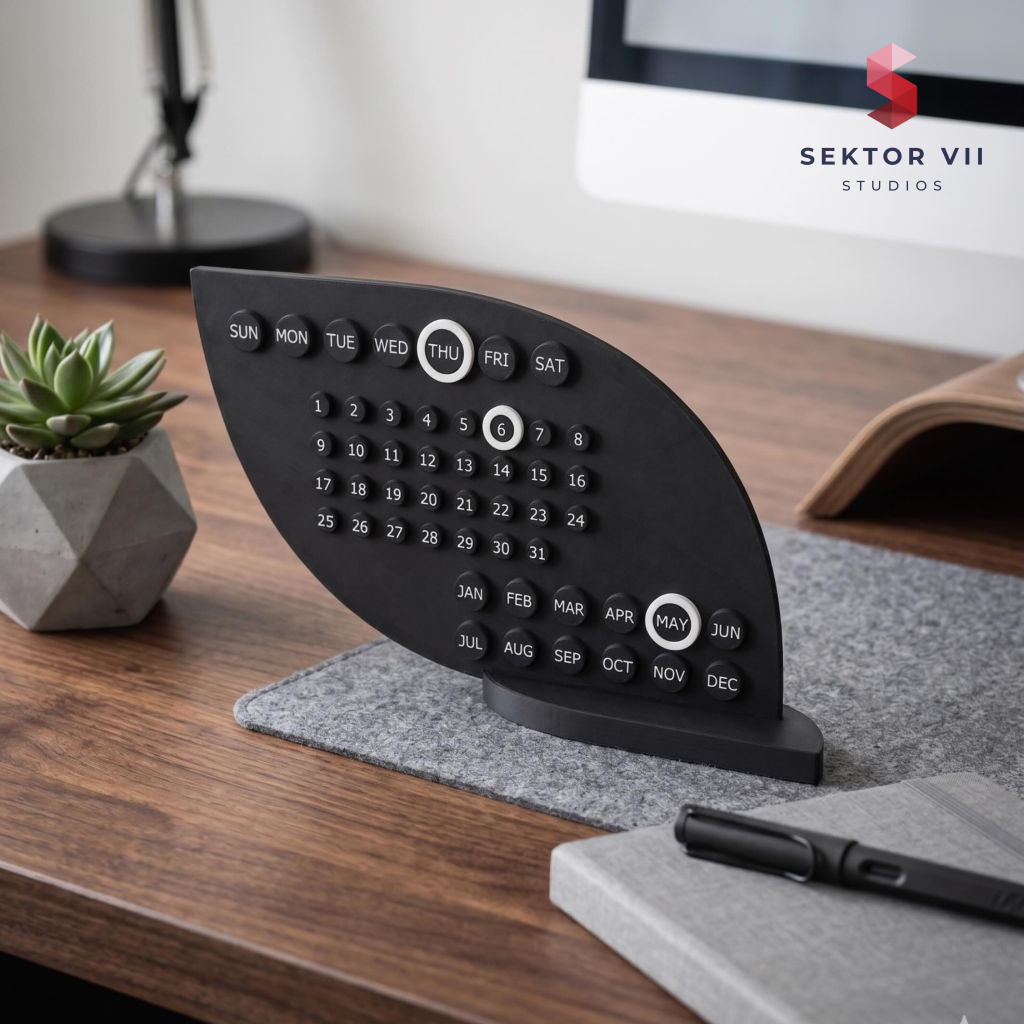 A real photo of our own print, shot in our white light box. The clean white background is real studio lighting, not a render - we print every model ourselves.We print every model ourselves. This render shows the original model exactly as it comes off the printer - only digitally staged.
Contents
Welcome back to Sektor 7 Studios, where apparently there is always room for one more STL. Today we are taking a closer look at the Perpetual desk calendar 3D print and everything that went into turning the idea into a printable design.
A perpetual desk calendar 3D print solves a small but real annoyance: paper calendars run out, and digital ones live behind a screen you’re already staring at too much. This one is built as a leaf-shaped body with separate marker pieces for weekday, date, and month, so once it’s printed you never need a new one again. You just slide the rings to the right spot each morning.
The leaf shape and what it’s made of
The design leans into a natural leaf outline rather than the usual rectangle, which gives it a softer presence on a desk than a typical calendar block. The body pairs with white marker rings in a black-and-white palette, so the numbers and labels stay easy to read without competing with the shape around them. The buttons for numbers, weekdays, and months are separate pieces that slot into the leaf body, which is what lets the whole thing double as both a display object and a tool you actually use.
Perpetual desk calendar 3D print as a daily habit
What makes it a perpetual desk calendar 3D print rather than a one-off decoration is the marker system. Instead of printing a new date, you reach over and slide the rings to the current weekday, date, and month, a change that takes a few seconds once you’ve got the motion down. That’s the whole point of a reusable design: the object stays constant and only the small moving parts change. It turns updating your calendar into a tiny daily ritual instead of a monthly chore of ripping off a page.
Two base options
The design ships with two different base versions, so you’re not locked into one look. This matters if your desk setup is tight on space or if you’d rather have a lower, more stable footprint versus a taller display stand. Either base uses the same slide-in stand mechanism, so swapping between them doesn’t change how the rest of the calendar goes together. It’s a small decision up front, but it’s worth picking the base that matches where the calendar will actually sit, whether that’s a crowded desk corner or an open shelf with room to spare.
Assembly and where it sits
The calendar is designed as a multi-part assembly, with the leaf body, the marker buttons, and the base printed as separate pieces that slide together rather than needing glue or fasteners. That keeps the build straightforward once everything is off the plate. Once assembled, it’s meant to live somewhere you’ll see it daily: a desk, a sideboard, a shelf, or a shared office workspace. It reads as a functional object first, but the leaf shape and clean finish mean it holds its own as a decorative piece too, which is really the idea behind printing a perpetual desk calendar 3D print instead of buying a disposable paper one.
Who it suits
This one is aimed at makers, students, and anyone who likes a bit of order on their desk without clutter. It doesn’t need batteries, apps, or replacement parts beyond what you already printed, and it fits naturally into an office essentials collection alongside other desk tools. If you print both base options you can decide later which one earns the permanent spot, or keep one as a gift for someone else’s desk.
That is all from the workshop for now. Keep the filament dry, the build plate clean, and a little space free on the print queue for whatever we come up with next.
Leon Sektor 7 Studios
Get this model
Every model is available as STL and 3MF files. Selling physical prints needs a commercial license; the files themselves may not be resold. Part of our library of 400+ models – every one included from $10 a month.
On social media
Commercial license
Recommended Print Settings
The settings and the filament we used for our own print of this model, and the combination that gave us the best result. A recommendation, not a requirement.
- Filament
- Bambulab PLA Matte black, white
- Infill
- 8% Gyroid or Grid
- Layer Height
- 0.2mm
- Walls
- 2
- Nozzle Size
- 0.4mm
- Support Structure
- none needed
- Brim
- None needed, but when you have adhesion problems than activate the brim
- Skirt Loops
- 1 (optional)
Tags
Join the conversation
Loading comments…